


“Blocked by robots.txt” in Google Search Console does not always mean your robots.txt is wrong – it can also mean Google never managed to fetch the file, or that a crawler you have never heard of is being challenged by your firewall. We just worked through both failure modes on a large e-commerce site behind Cloudflare: a WAF change silently locked out Google’s crawlers, the error count climbed past 100,000 URLs, and even after the firewall was fixed, a structurally messy robots.txt kept the site from recovering. This is the full post-mortem, day by day: what broke, how we traced it through Cloudflare Events and Search Console, and the numbers before and after.
If you run a site behind Cloudflare, this case is worth ten theory articles. It shows exactly where the standard checks fail and gives you the monitoring routine we now apply to every SEO program we manage for sites behind a CDN or firewall.
Day 1: crawling falls off a cliff
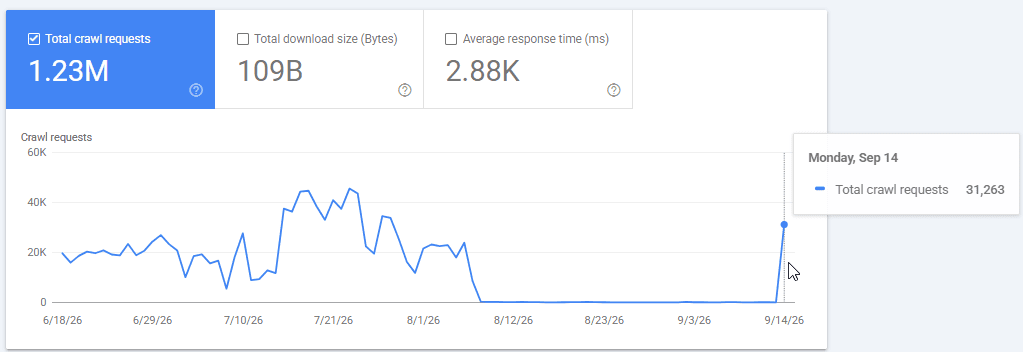
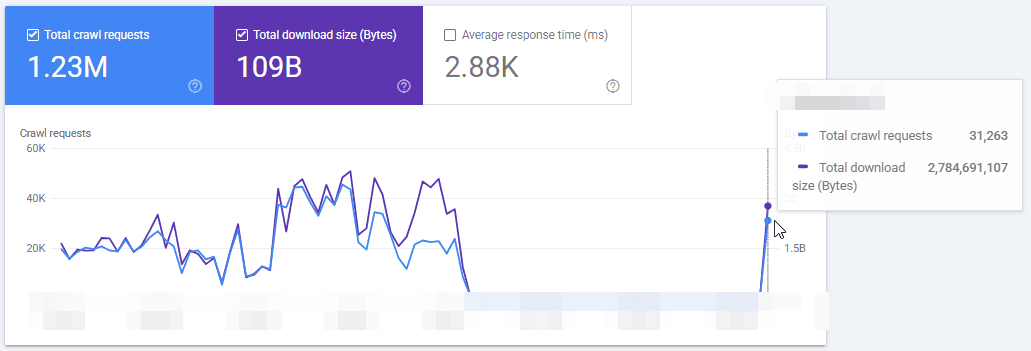
The incident had a precise start date. On day one, a set of anti-bot and geo rules was changed in Cloudflare’s WAF. From that day, the Crawl Stats report in Search Console shows a sharp drop: Googlebot’s crawling collapsed to roughly 100 pages a day on a catalog of tens of thousands of URLs. Google’s snippet for the homepage turned into “no information is available for this page,” the homepage got a “blocked by robots.txt” status in Search Console, and the number of URLs with that error grew past 100,000.
Here is the part that makes this case instructive: the robots.txt file itself contained no rule blocking the homepage, products, categories, brands, or pagination. Every check we could run said the file was fine:
- Search Console’s robots.txt report showed the file fetched successfully, zero errors.
- Third-party robots.txt testers all confirmed the homepage was not blocked.
- The file opened normally in a browser.
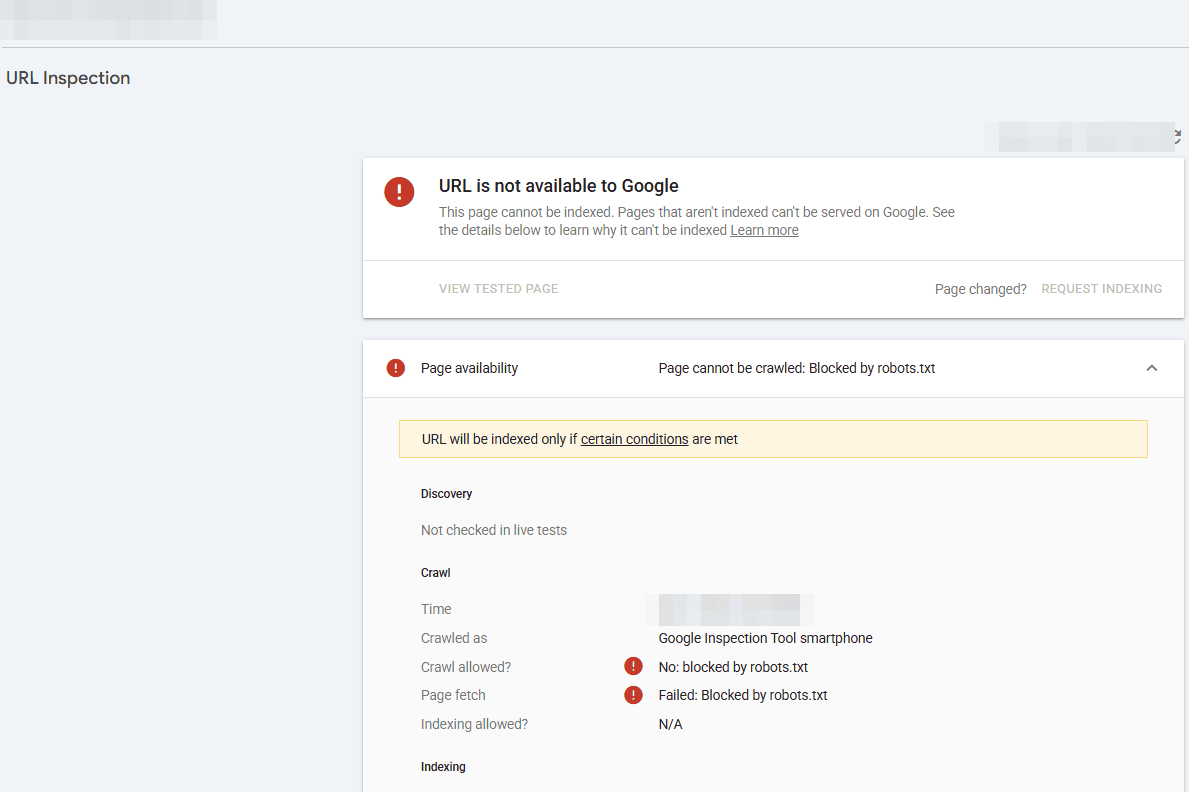
When every validator disagrees with Googlebot, believe Googlebot. The tools parse your file; only Google knows what its crawler actually received. And when Google cannot fetch robots.txt at all – because a firewall serves a challenge or an error instead of the file – it plays it safe: per Google’s documentation, it first stops crawling the site, and if the file stays unreachable while the site looks unavailable, it halts crawling entirely. To Search Console, that condition reports as “blocked by robots.txt” even though the file’s content is innocent.
Sources and further reading
The primary documentation this article is based on:
- Google Search Central – How Google interprets the robots.txt specification (official documentation).
- Google Search Central – Robots.txt report in Search Console (help documentation).
- Google Search Central – Crawl Stats report (help documentation).
- Google Search Central – Overview of Google crawlers and user agents (official documentation).
- Cloudflare Docs – Verified bots (bot solutions documentation).
- Cloudflare Docs – Allow traffic from verified bots (WAF custom rules documentation).
Day 30: the investigation – suspect everything that filters traffic
Why did a month pass before the alarm went off? Three reasons, and they are worth naming because they will apply to your site too. Search Console reports indexing errors with a delay, and during a Google update rollout that lag stretched to weeks. Our error review ran on its monthly cycle, so the ballooning “blocked by robots.txt” count surfaced at the start of the next month. And the one report that showed the problem in near real time – Crawl Stats – was not part of anyone’s routine, because nothing on the site had “changed.” That last gap became a standing rule for us: any significant infrastructure change now triggers a scheduled before-and-after check of crawl statistics, and this incident is why.
We started from the hypothesis that some Cloudflare mechanism was intercepting Google: WAF custom rules, Bot Fight Mode, rate limiting, or geo rules. The first practical obstacle was access – the initial Cloudflare account we were given could not see Security Events or the WAF. If you take one operational lesson from this section, take this one: to debug a crawling incident you need zone-level access to Security Events, WAF, Bots, rate limiting, and cache rules. We requested it, got administrator rights on the zone, and went straight to the block logs.
The real culprit: Google is not one bot
The firewall already had an SEO allow rule – but it matched user agents containing the strings “Googlebot” and “bingbot” and nothing else. The problem: Google crawls and checks your site with a whole family of agents. The live URL test in Search Console, for example, runs as Google-InspectionTool. That name does not contain “Googlebot,” so every live test fell through the allow rule into the challenge rules below it – which is exactly why regular crawling partially worked while URL Inspection kept stamping the homepage “blocked by robots.txt.”
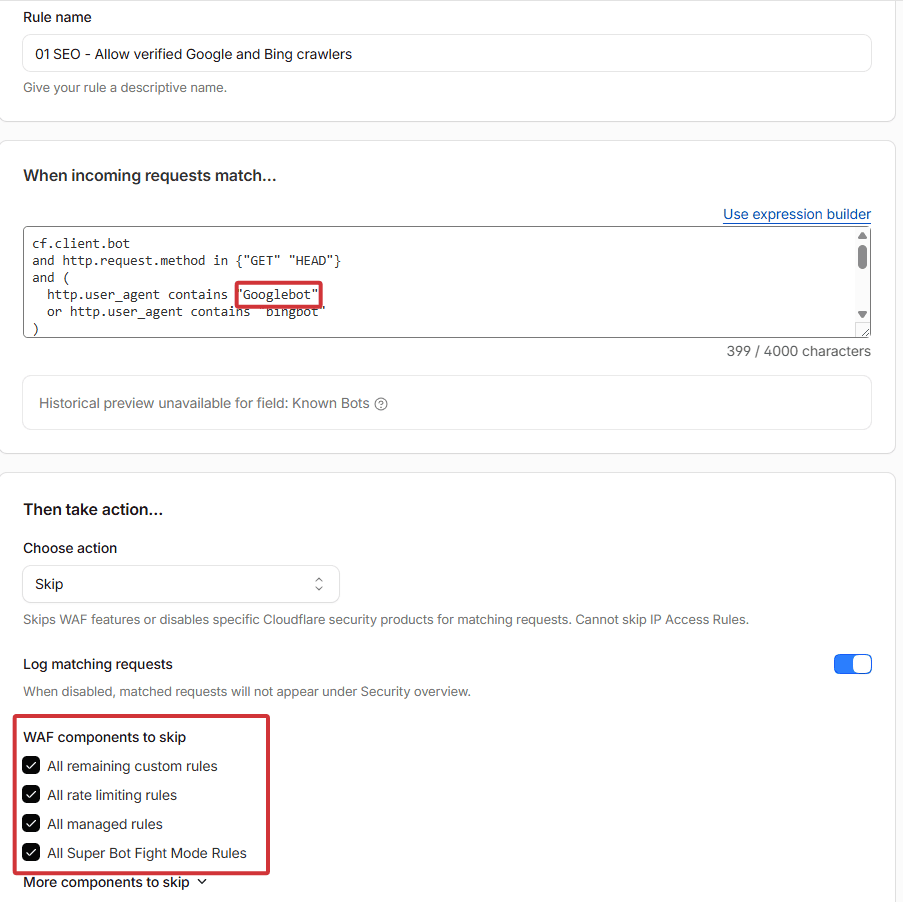
Cloudflare Events confirmed it in one screen: in a single 24-hour window, 16 block events and 12 challenge events against genuine Google agents, including requests for robots.txt itself. The fix went in two steps. First, the tactical one: extend the exceptions to the agents Google and other engines actually use – Google-InspectionTool, GoogleOther, Storebot-Google, AdsBot-Google, BingPreview – across every rule that could catch them, not just the one allow rule. Then the durable one: replace the hand-maintained user-agent list entirely with Cloudflare’s own bot classification:
cf.verified_bot_category eq "Search Engine Crawler"
This condition matches every crawler Cloudflare has cryptographically verified as a search engine agent – by published IP ranges and reverse DNS, not by the name in the request header. It covers agents you forgot about and agents that do not exist yet, and it does not match impostors. Alongside it we updated a pagination-filtering rule that was still catching Google-InspectionTool, added a dedicated cache rule for /robots.txt, purged the file from the edge cache, and moved AI-crawler management into Cloudflare’s AI Crawl Control instead of hand-written rules.
Days 31-32: the firewall is clean, but Google still says blocked
The next 24 hours of Cloudflare Events looked the way they should: 231 successful robots.txt fetches by Googlebot – roughly ten per hour – zero blocks and zero challenges for genuine Google agents, AdsBot passing cleanly, and Googlebot slowly ramping up with 548 page requests. Bingbot, which had also been partially caught, ran 47,700 successful requests over the week.
Two categories of blocked traffic remained, and both were correct: internal platform endpoints that are intentionally closed, and 25 requests claiming to be Googlebot from cloud servers in Taiwan – fake crawlers that Cloudflare’s verification rightly challenged. That is the second lesson of this case: never trust the user-agent string alone. An allow rule for anything that calls itself Googlebot is an open door for scrapers; verified-bot classification lets the real one in and keeps the impostors out.
But Search Console kept showing “blocked by robots.txt,” and daily crawling stayed far below normal. Part of that is expected – GSC statuses lag days behind reality, which is why you verify a fix in Cloudflare Events and server logs, not by refreshing Search Console. But as the days passed, the crawl rate was not recovering the way a pure reporting lag would predict. Something else was still wrong.
Day 37: the second cause – a “valid” robots.txt with two user-agent groups
One of our remaining hypotheses was to force Google to reload and re-evaluate robots.txt – not just request a recrawl, but actually change the file, because a changed file is guaranteed to be reparsed as new. While preparing that change we took a hard look at the file’s structure.
The site’s e-commerce platform auto-generates the top of robots.txt: a User-agent: * line and the sitemap reference, followed by a marked custom section. Our custom rules had been added with their own second User-agent: * declaration. So the file effectively contained two wildcard groups – one holding only the sitemap, one holding all the actual rules. Here is the structure, simplified:
User-agent: *
Sitemap: https://domain.com/sitemap.xml

User-agent: *
Content-Signal: search=yes,ai-train=no,use=reference
Allow: /web/assets/
Allow: /web/image/
Disallow: /web/
Disallow: /shop/cart
Disallow: /shop/checkout
Disallow: /my
Disallow: /website/info
Two User-agent: * lines, one file. Every robots.txt checker accepted it, and Google’s spec even says duplicate groups get merged. But how a crawler picks its rules is more subtle than most tools model:




 Previous article
